Overview
When planning an international shipment in UPS Forwarding Hub, brokerage charges may be included in your shipment total based on your selected services and shipment details.
- Recommendations help choose brokerage services
- Charges reflect the cost of those services
You can review and adjust brokerage selections before submitting your shipment.
When to Use This
- You want to understand how brokerage charges are applied to your shipment
- You need to review brokerage pricing before confirming a quote or booking
- You want to compare brokerage options and their impact on total cost
- You want to understand why your shipment total includes brokerage fees
Before You Begin
Make sure you have:
- Your shipment’s selected Incoterm
- Accurate shipment details, including origin and destination
- A clear understanding of your selected brokerage arrangement
Make sure you understand:
- Brokerage charges are typically included in:
- The total cost displayed during the quoting process
- The selected rate when reviewing quote options
- The final shipment details during booking
- Brokerage Charges may be influenced by several factors, including
- The selected brokerage services (import and/or export)
- Shipment details such as origin, destination, and cargo type
- Shipment-party responsibilities based on the Incoterm
- The selected brokerage arrangement (UPS brokerage or third-party broker)
These factors help determine how brokerage services are applied and how associated charges are calculated.
Step-by-Step Instructions
| A. Review Brokerage Rates During Quote Creation |
1. Start your shipment
Complete quote detail fields and submit to get shipment rates.
2. Review the recommended brokerage options and associated fees
Locate the Brokerage section on the rates results screen.
Review the import and export brokerage options/fees recommended for your shipment.
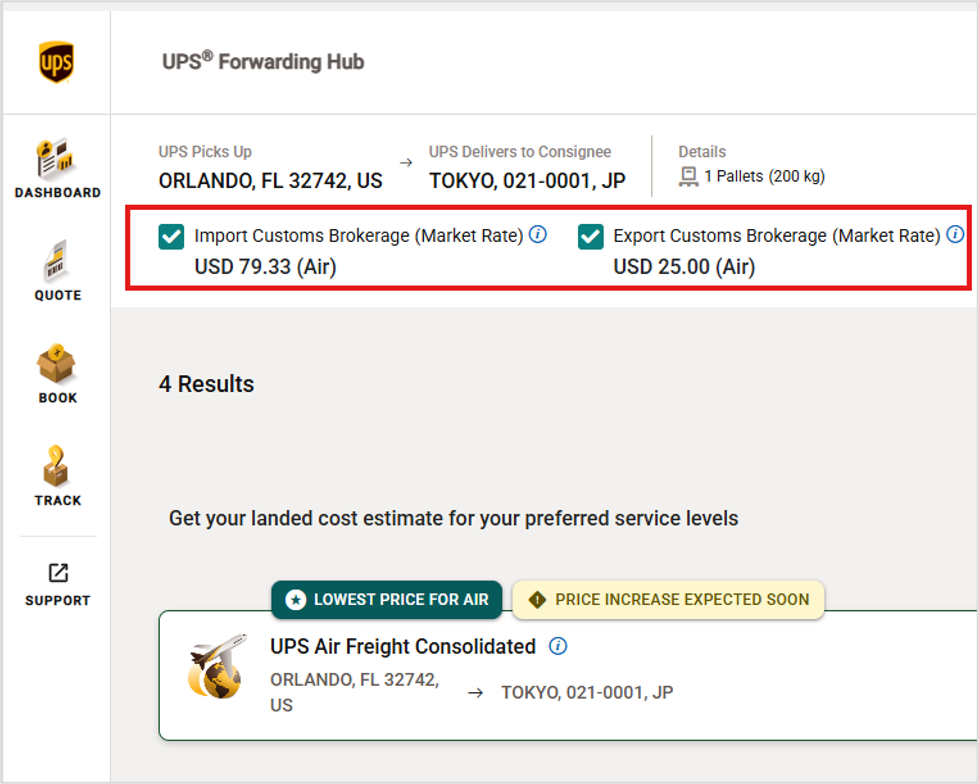
Example of brokerage rates displayed during quoting. (click to enlarge)
3. Verify and compare the selected brokerage options
Review the rates and check whether the system has selected:
- Import brokerage
- Export brokerage
- Or both
Recommendations are based on your shipment setup (e.g., Incoterm, parties, and responsibilities).
4. Update brokerage options, if needed
If the recommendation does not meet your needs:
- Select a different brokerage option
- Choose a third-party broker (if supported)
5. Confirm before submitting
Before selecting and booking your rates:
- Review brokerage selections
- Confirm they match your shipment requirements
Brokerage selections are automatically applied to your quote. You will provide additional brokerage and/or have the opportunity to change selections during the booking phase.
| B. Review Brokerage Recommendations While Booking/Pickup Request |
6. Proceed to book your shipment and provide customs broker information:
- If you only need import, export brokerage services or both. You can also select neither and provide non-UPS broker contact details
- The selected brokerage services are accurate
- Any updates or changes are made before submission
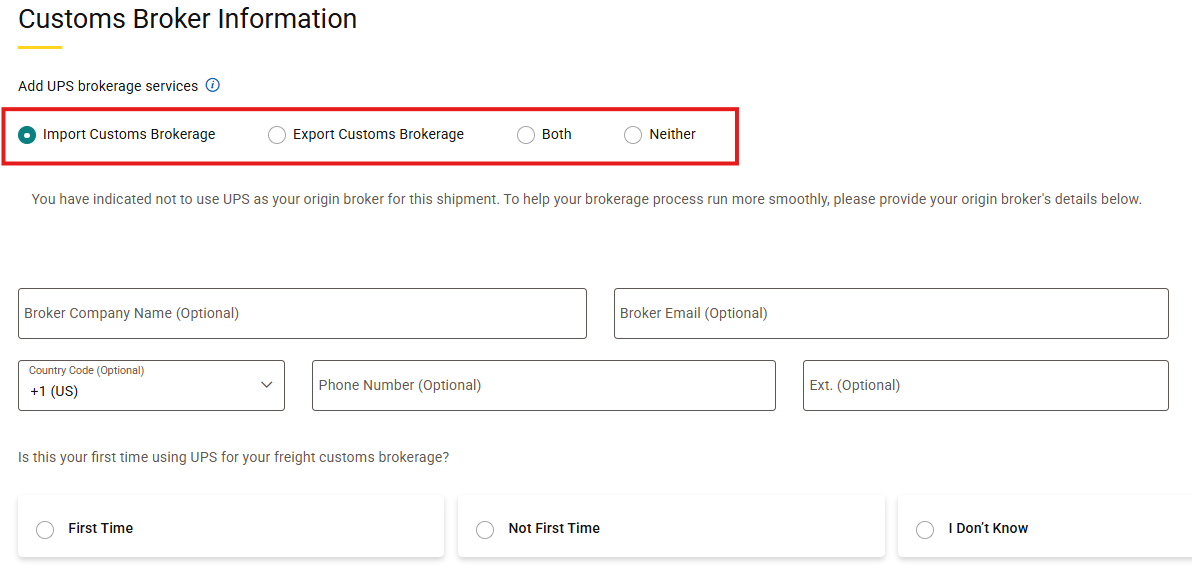
Example of brokerage details during shipment booking. (click to enlarge)
7. Review and approve finalized shipment charges
- Check to make sure you see your desired brokerage rates applied
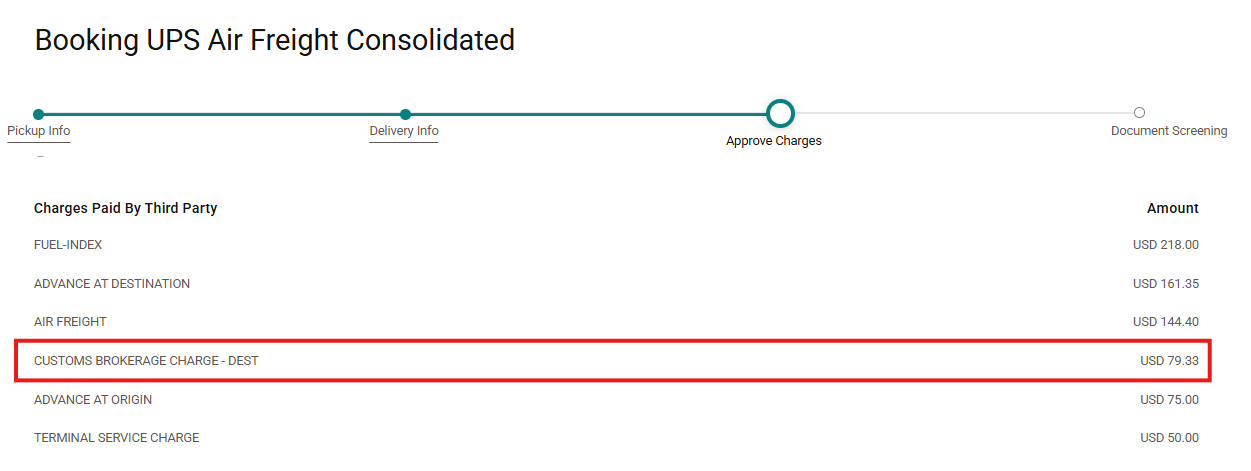
Example of charges displayed during shipment booking. (click to enlarge)
8. Proceed with processing your shipment
Once you submit your booking request charges will automatically apply to your final invoice. it's important to know that if brokerage changes occur while your freight is in transit, these fees will be applied separately.
Frequently Asked Questions
Why does my total cost include brokerage charges?
Brokerage charges may be included when brokerage services apply to your shipment. Review selected brokerage services in the quote and booking phase when processing a shipment. Confirm whether import or export brokerage applies to your shipment.
Why did my brokerage charges change during the process?
Brokerage charges may change if shipment details or selections are updated. Check for updates to shipment details such as Incoterm or shipment parties. Review any edits made to brokerage selections while updating shipping details.
How can I avoid or reduce brokerage charges?
Brokerage charges depend on shipment responsibilities and selected services. Verify whether brokerage is required based on your shipment type and details. Update your brokerage selection or provide third-party broker information, if needed
Related Articles
- How to Select Brokerage Options in UPS Forwarding Hub
- Sign Up for UPS Customs Brokerage Services in UFH
Was this article helpful?
That’s Great!
Thank you for your feedback
Sorry! We couldn't be helpful
Thank you for your feedback
Feedback sent
We appreciate your effort and will try to fix the article